Bring your hosts over
Vaulterm can read the SSH setup already on this computer and turn it into hosts, identities and keys in your vault. You see everything it found before anything is saved.
Start an import
Section titled “Start an import”Any of these opens Import from this computer:
- Import from this computer on Home.
- Import at the top of the Hosts page.
- The Command Center: type
importand choose Import hosts and keys from this computer.
Vaulterm reads the files, then shows a review. Nothing is written to your vault until you press the import button at the bottom.
What Vaulterm reads
Section titled “What Vaulterm reads”On every system, from your ~/.ssh folder (%USERPROFILE%\.ssh on Windows):
config, and every file it pulls in withInclude- private keys: the files your config names with
IdentityFile, plusid_ed25519,id_ecdsaandid_rsa known_hostsandknown_hosts2, including hashed lines
On Windows, also from PuTTY:
- saved sessions (SSH ones only; “Default Settings” is skipped)
.ppkkey files the sessions point at, versions 2 and 3- the host keys PuTTY already trusts
Files over 1 MiB are skipped.
How your ssh config is read
Section titled “How your ssh config is read”Vaulterm reads ~/.ssh/config the way ssh -G does. Take this config:
Host bastion  HostName 203.0.113.10  User jump
Host web-01 web-02  HostName %h.prod.internal  User deploy  IdentityFile ~/.ssh/ci-deploy  ProxyJump bastion
Host *  Port 22  ServerAliveInterval 30
The review lists three hosts: bastion, web-01 and web-02. web-01 connects to web-01.prod.internal as deploy with the key ci-deploy, through bastion as a jump host.
The rules:
- Each name on a
Hostline becomes a host. Patterns (*,web?,!db) aren’t hosts of their own, but their settings apply to the hosts they match, as they do inssh. - The first value found for a setting wins, reading from the top. Put
Host *last, assshexpects. Includeworks with globs (Include config.d/*), up to 8 levels deep.HostNamecan use%h.IdentityFilecan use~,%d,%u,%rand%h.ProxyJumpchains work:ProxyJump gw,ops@bastion:2200becomes jump hosts in that order. Jump hosts named in your config are imported as hosts too.ProxyJump nonemeans no jump.- Vaulterm uses
HostName,Port,User,IdentityFile,ProxyJump,ForwardAgentandIdentityAgent. Other settings, likeServerAliveIntervalabove, are ignored: Vaulterm has its own keep-alive.
Some things can’t come across, and the review says so on the host or at the bottom:
| In your config | What happens |
|---|---|
Match blocks |
Skipped, with a note: their settings depend on conditions Vaulterm doesn’t check. |
ProxyCommand |
The host is imported without it, with a note. Use ProxyJump if you can. |
LocalForward, RemoteForward, DynamicForward |
Not imported, with a note. Add them as tunnels. |
An IdentityFile that doesn’t exist |
“Key file ~/.ssh/old_key isn’t there.” on the host. |
| Hosts that jump through each other in a loop | The import stops: “Some of these hosts jump through each other in a loop. Untick one of them and try again.” |
Review what was found
Section titled “Review what was found”The review has up to three parts.
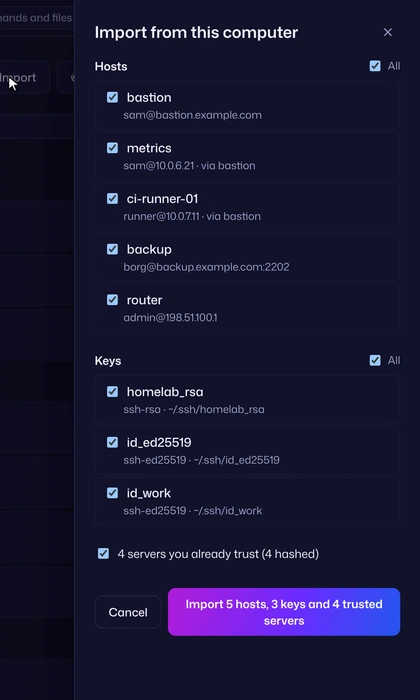
Each row shows the name and the address, with the user, port and jump hosts ([email protected] · via bastion). Every new host starts ticked: untick the ones you don’t want. All ticks or unticks every host at once. A host that Vaulterm already has (same address, port and user) says Already in Vaulterm and can’t be ticked.
Each row shows the key’s name, type and file (ssh-ed25519 · ~/.ssh/ci-deploy). Every new key starts ticked, with its own All box when there are two or more. A key protected with a passphrase shows a “Passphrase for ci-deploy” field when ticked. Type the passphrase there. Vaulterm needs it once, to store the key in your vault; it doesn’t keep the passphrase.
Trusted servers
Section titled “Trusted servers”A checkbox such as “12 servers you already trust (9 hashed)”. Leave it ticked to copy those host keys, so Vaulterm doesn’t ask you to trust servers you’ve already checked.
Notes and the import button
Section titled “Notes and the import button”At the bottom, notes list anything skipped and why, such as “~/.ssh/id_x.pub: Public key, not a private key” or “Couldn’t read this key”.
The import button names what it will do, for example “Import 3 hosts, 1 key and 12 trusted servers”.
If a key needs its passphrase
Section titled “If a key needs its passphrase”If you tick an encrypted key and leave its passphrase empty, or type the wrong one, nothing is imported. The key’s row says “Needs its passphrase” or “Wrong passphrase”. Fix it and press the import button again. Vaulterm does it this way on purpose: importing the hosts without their key would set them up to sign in some other way, and a later import wouldn’t fix them.
A PuTTY key that can’t be used says “The key file is damaged” or “This kind of PuTTY key isn’t supported”.
What you end up with
Section titled “What you end up with”After the import, Vaulterm says what it wrote (“Imported 3 hosts, 1 key and 12 trusted servers.”), lists anything that needs a look (such as “web-01: Imported without its key” when a key file turned out to be damaged), and offers Show imported hosts and Done.
- Hosts from
~/.sshgo in a group called Imported from this computer. PuTTY sessions go in Imported from PuTTY. Move them into your own groups whenever you like. - Keys go into your vault and show on the Keys page.
- Each host gets an identity for its user and way of signing in. Hosts that share a user and key share one identity. If you already have an identity that matches, Vaulterm uses it instead of making another.
- A host signs in with its key when the key was imported, with your SSH agent when the host has no key and an agent is running, and otherwise with a password it asks for when you connect.
ForwardAgent yesin your config, or agent forwarding in PuTTY, turns on agent forwarding for that host.- Trusted host keys are added to Vaulterm’s own list. Your
known_hostsfile isn’t changed.
Everything is written in one step. If anything in the selection is refused, nothing is written.
PuTTY on Windows
Section titled “PuTTY on Windows”Vaulterm reads PuTTY’s settings from the registry of the Windows user you’re signed in as.
- A session named
My Serveris imported with that name. - The session’s host name, port, user name (including
user@hostwritten in the host name field) and private key file come across. - PuTTY’s proxy settings aren’t imported. The review notes “PuTTY’s proxy settings aren’t imported.” on those sessions.
- Telnet, serial and rlogin sessions are skipped.
Good to know
Section titled “Good to know”- The import runs on this computer only. Nothing is sent anywhere.
- Your files aren’t changed or moved. Delete them yourself once you’re happy with Vaulterm, or keep using them with
sshalongside it. - The review holds the keys it read for 10 minutes, and drops them if the vault locks. Import after that and Vaulterm says “This review is out of date. Scan again to import.” Press Scan again.
- Running the import again later only offers what’s new: everything already imported shows Already in Vaulterm. If nothing is new, it says “Nothing new to import: it’s all in Vaulterm already.”
- If Vaulterm finds no
~/.sshsetup at all, it says so and offers Add host instead.